If you’re leaving iorad because private tutorials cost too much, Scribe or Tango give you click-captured step guides for a fraction of the price. If you want the interactive “click through it yourself” format, Supademo and Arcade are the closest substitutes. If your viewers need to see and hear the workflow explained, Guidde makes AI-narrated videos and Chairkick keeps your real narrated recording on the same page as the written steps.
The deciding factor is usually price, not features. iorad’s free plan is generous, but everything on it is public. Private tutorials start at $200/month for one creator.
iorad alternatives at a glance
Prices were checked on each vendor’s official pricing page in October 2026. Where a vendor offers a discount for annual billing, the annual rate is shown as a monthly equivalent.
Looking for a lower-cost way to document processes? If you want narrated video plus written steps on one page, Chairkick may fit better than screenshot-first tools. Compare pricing
| Tool | Output type | Best for | Starting paid price |
|---|---|---|---|
| iorad | Captured steps played as interactive, video, scroll, or slide tutorials | Training libraries with a big budget | $200/mo, 1 creator |
| Scribe | Screenshot step guides | General documentation at volume | $25/seat/mo; teams $13/seat, 5-seat minimum |
| Tango | Screenshot step guides | Internal SOPs and process training | $22/user/mo (1–2 users); $15/user/mo (3+) |
| Supademo | Interactive product demos | Sales and onboarding demos | $38/creator/mo |
| Arcade | Interactive demos and videos | Marketing and product launches | $42.50/mo per seat |
| Guidde | AI-voiceover how-to videos | Video documentation at volume | $19/creator/mo |
| Chairkick | Real narrated video plus written steps on one page | Customer support and onboarding answers | $6/mo billed yearly ($9 monthly) |
Why people look for iorad alternatives
The format usually isn’t the problem. iorad captures a workflow once, and the free plan lists six ways to play it back: Interactive, Video, Scroll, Slide, Quiz, and Do. That range is one of iorad’s genuine strengths. The common reasons people leave are these:
- Private content is expensive. The free plan includes unlimited tutorials, but iorad describes them as “public tutorials that the world can see,” indexed by search engines. That’s fine for public product help, and a dealbreaker for internal processes. Keeping tutorials private means the Individual plan at $200/month, or Team at $500/month with one seat included and $50/month for each extra seat. Enterprise (20+ creators) is quote-only. One reviewer on Software Advice put it plainly: “The pricing gets expensive fast.”
- Editing captured steps can be fiddly. Another Software Advice reviewer wrote that “editing a step can be frustrating if you want to change where to click.” A third found step-by-step capture overwhelming for long processes.
- Getting content out isn’t always clean. Reviewers mention PDF output that “crops out a significant amount of the screenshot” and trouble pasting HTML into knowledge-base tools.
Every playback format is still built from the clicks you captured. If what’s missing is a person explaining why, no iorad format will add it.
Scribe: the cheapest like-for-like swap
Scribe captures your clicks and writes a numbered guide with a screenshot for each step. It’s the most common destination for teams leaving iorad over price. The free Basic plan works in the browser, with link and embed sharing. Pro Personal is $25/seat/month billed annually ($35 monthly) and adds desktop capture, branding, redaction, and PDF, HTML, and Markdown exports. Pro Team is $13/seat/month billed annually ($17 monthly) with a five-seat minimum. You give up iorad’s interactive player. For a fuller look at the field, see the best Scribe alternatives.
Tango: screenshot guides for internal processes
Tango uses nearly the same capture flow as Scribe but is built more for SOPs and process adherence. The free plan allows 5 shared workflows for up to 10 users. Pro costs $22/user/month billed annually ($26 monthly) for one or two users, and $15/user/month ($20 monthly) once a workspace has three or more. Pro adds desktop capture and PDF, Markdown, and HTML exports. We compared the two in detail in Scribe vs Tango.
Supademo and Arcade: if you want to keep the interactive format
If your learners rely on clicking through a simulated product, look at these two.
Supademo builds guided interactive demos. The free plan includes 5 interactive demos for one creator. Scale is $38/creator/month billed annually ($50 monthly). Business starts at $199/month billed annually. It’s aimed more at sales and onboarding than at internal training, but the viewer experience is closest to iorad’s interactive mode.
Arcade makes interactive demos and videos with a strong marketing focus. The free plan allows one published demo. Growth is $50/month per seat, or $42.50 billed annually.
Both are far cheaper than iorad for a single creator who needs private content.
Guidde: AI-narrated video documentation
Guidde turns a capture into a how-to video with an AI voiceover. The free plan covers up to 25 videos. Pro is $19/creator/month billed annually ($29 monthly). Business is $39/creator billed annually and adds the desktop app and PDF/PPT conversion. Choose it if you want video output at volume and a synthetic narrator is acceptable.
Chairkick: keep the real video and the guide
Chairkick starts from a narrated screen recording instead of a click capture. You record the walkthrough once in the browser, with nothing to install. AI turns the transcript into a How-to: editable written steps with timestamps and a screenshot from the recording for each one. Customers get a single unlisted page where they can watch the walkthrough, skim the steps, or jump to the moment they need. They don’t need an account.
Pricing is per recorder. Pro is $9/month, or $6/month billed yearly, and teammates, clients, and anyone with the share link watch for free. New accounts get a 14-day Pro trial with no credit card.
There are trade-offs. Chairkick doesn’t make interactive click-through demos, and guides are shared as a hosted page, so there’s no PDF or Markdown export today. It fits support and onboarding answers where the explanation matters more than the clicks. See how video guides work.
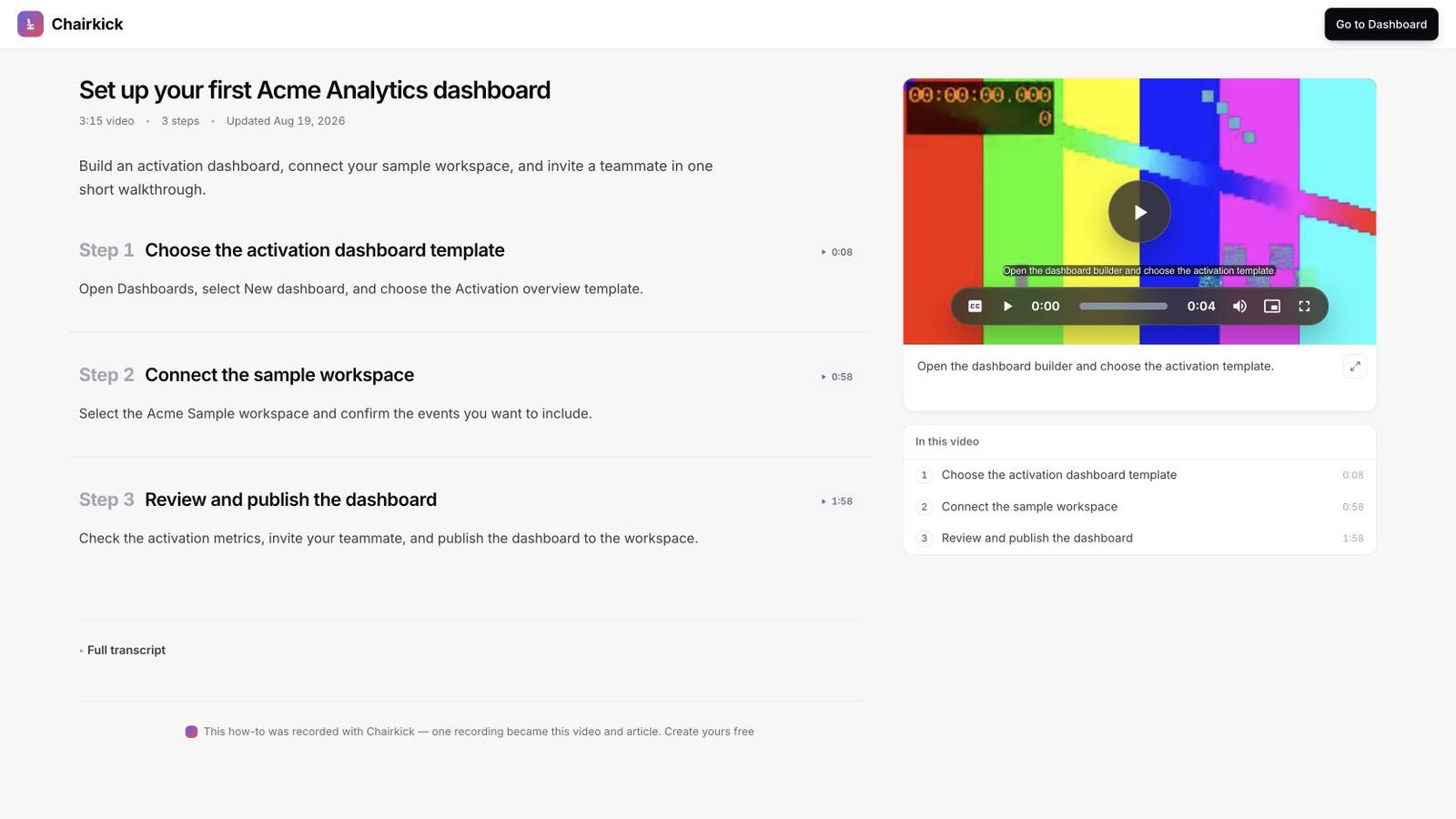
A real Chairkick guide in a synthetic workspace: the narrated recording, skimmable steps, and timestamps on one page.
Scribe vs iorad
These two tools capture the same raw material, a run through a workflow, and package it differently. Scribe makes a document you read. iorad makes a tutorial you can play several ways, including hands-on. The bigger difference is cost structure. Scribe charges per seat. iorad charges a flat plan fee and then adds per-seat costs on Team.
Worked example: a 10-person documentation team where all ten create content. iorad’s pricing page doesn’t list a “Pro” plan, so the comparable tiers are Scribe Pro Team and iorad Team.
| Scribe Pro Team | iorad Team | |
|---|---|---|
| Monthly billing | 10 × $17 = $170/mo ($2,040/yr) | $500 + 9 × $50 = $950/mo ($11,400/yr) |
| Annual billing | 10 × $13 = $130/mo ($1,560/yr) | 11 months × $950 = $10,450/yr (one month free on annual) |
| Difference | iorad costs $780/mo more on monthly billing, or $8,890/yr more on annual |
That’s between five and seven times the cost for the same ten creators. The premium buys what Scribe doesn’t offer: interactive and quiz modes and several playback formats from one capture, with unlimited learners on every paid plan.
If only two of the ten people create content, iorad Team is $550/month. Scribe still charges its five-seat minimum, which comes to $65/month billed annually. For comparison, ten recorders on Chairkick would cost $60/month billed yearly, and two would cost $12. Run your own numbers with the number of people who will actually create content, not your total headcount.
If you’re weighing a screenshot guide against a recorded walkthrough more generally, Loom vs Scribe covers that choice.
What about free?
iorad’s free plan is the most generous here if your tutorials can be public: unlimited creators, unlimited public tutorials, and all playback formats. Teaching people to use a public website or your own public help content are good examples. For private internal guides, Scribe’s free Basic plan (browser capture, link sharing) and Tango’s free plan (5 shared workflows) are the realistic free options. Guidde’s free plan covers up to 25 videos. Supademo allows 5 interactive demos, and Arcade allows one published demo.
Bottom line
Leaving over price and happy with screenshot guides? Choose Scribe for teams of five or more, or Tango for one or two authors. Need the interactive player? Supademo or Arcade cost a fraction of iorad’s private plans. Want AI-narrated video? Guidde. And if your customers need to see the workflow explained by a person, Chairkick keeps the real recording and drafts the written How-to from it. Try it with the 14-day Pro trial.
Sources and fact check
Checked October 2026 against the official pricing pages of iorad, Scribe, Tango, Supademo, Arcade, and Guidde. User quotes come from iorad reviews on Software Advice. The 10-person example uses list prices before tax, and enterprise quotes can differ. Check current pricing before you commit.