The product demo video maker without the editing grind.
You don't edit a good demo — you record it well. Chairkick captures your screen and face in the browser, trims the rough edges, and turns it into a share link that tells you who watched. It can even build a showcase page from the recording — capabilities, screenshots, and a call to action, pulled from your demo.
 2:14
2:14
One recording. A demo video and a demo page.
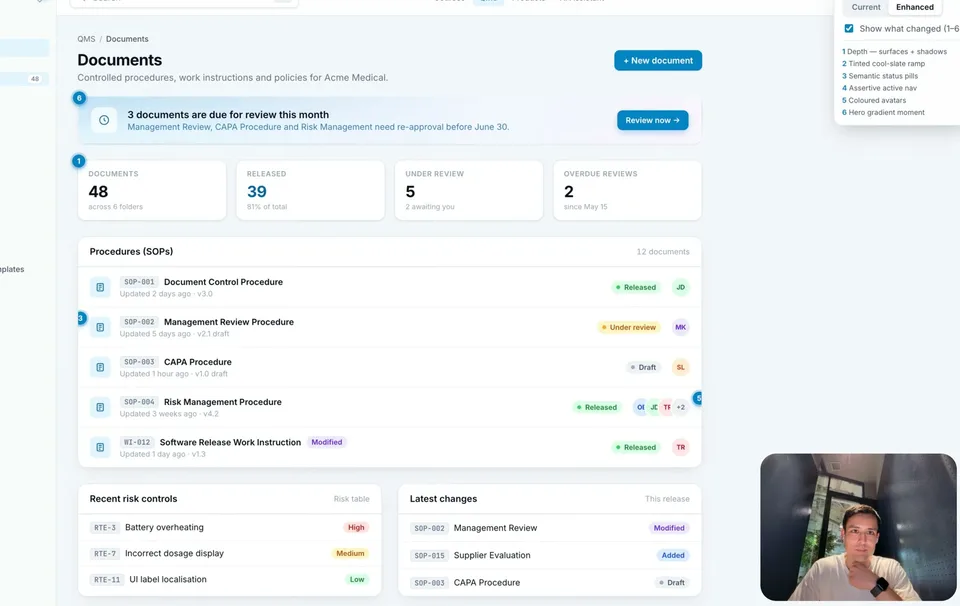
Record your SaaS or app demo once, and Chairkick can build a showcase page from it: a headline, the capabilities you showed with screenshots pulled from the video, and a call to action — each linked to the exact moment in the demo. One link works for the prospect who watches and the one who skims.
A headline that sells the point.
The showcase opens with what you built and why it matters — written from your own narration, editable down to the word.
Capabilities with real screenshots.
Each capability gets a screenshot from the right moment of the recording — clicking one jumps the video straight there.
A call to action that travels.
Close with the next step — book a call, start a trial — anchored to the end of your demo, on a page you send as one link.
Built for SaaS demo videos, app demos, client walkthroughs, and take-home assignments.
How to make a product demo video
The demos that convert aren't polished films — they're a real person showing the real product. Ten minutes, five steps.
-
1.Write three bullet points, not a script
The problem, the moment your product solves it, what to do next. A full script makes you sound like you're reading — bullets keep you human.
-
2.Check your mic
Bad audio kills demos faster than bad visuals. Run the 10-second mic test before you hit record.
-
3.Record your screen with your face in the corner
Start a Chairkick recording, share the product window, and keep the camera bubble on — prospects trust demos with a human in them. One take is fine.
-
4.Trim, don't edit
Cut the fumbled start and the trailing "so, yeah". Chairkick trims on the timeline or by clicking words in the transcript — no timeline software to learn.
-
5.Share the link and watch who watches
Send one unlisted link in your email or proposal. Chairkick shows you views, so "did the prospect watch the demo?" stops being a mystery.
Built for demos that sell.
See who watched.
Every demo link reports its views — follow up with the prospect who watched twice, not the one who never opened it.
Viewers always free.
Prospects and teammates watch without accounts or seats. You pay per recorder, never per viewer.
AI does the summary.
Each demo gets a transcript, chapters, and an AI summary — skimmers get the gist, buyers get the detail.
Demo tools, compared.
Screen Studio makes beautiful cursor-animated demos. Loom and Chairkick make fast ones. Here's the honest split.
| Capability | Chairkick | Screen Studio | Loom |
|---|---|---|---|
| Time to a shareable demo | Minutes — record and share | Longer — export + edit workflow | Minutes |
| Works on | Any browser — Mac, Windows, Linux, ChromeOS | macOS only | Desktop apps + browser |
| Viewer analytics on share links | Yes | No hosted analytics focus — exports files | Yes |
| Comparable paid plan | $9 / user / mo · $6 billed yearly | $20 / mo, or $9 / mo billed yearly | $18 / user / mo · $15 billed yearly |
| Free trial | 14 days of full Pro — 4K, 2-hour recordings, no credit card | No free plan | 5-minute recordings, 25 videos |
| Polished motion effects | No — built for speed, not cinema | Yes, its specialty | No |
Competitor details checked against Screen Studio's and Loom's public pricing pages on August 4, 2026.
Frequently asked questions
What's the best way to make a product demo video?
Record a real walkthrough: your screen, your voice, your face in the corner. Skip heavy editing — trim the start and end, and ship it the same day. Prospects prefer an authentic 3-minute walkthrough over a produced 30-second trailer they don't quite believe.
How long should a product demo video be?
Two to five minutes for outbound sales demos; up to ten for onboarding walkthroughs. Chairkick's chapters and AI summary let busy viewers jump to the part they care about, which takes the pressure off keeping it short.
Can prospects watch without signing up?
Yes. Chairkick share links are unlisted and open to anyone — no account, no download, and viewers never cost you a seat.
Can I see whether a prospect watched my demo?
Yes — each recording shows its views, so you know whether the demo landed before your follow-up call.
Do I need video editing skills?
No. Recording is one click, and cleanup is trimming on a timeline or clicking words in the transcript to cut them. If you can use a word processor, you can cut a demo.
Can Chairkick turn my demo video into a page?
Yes. Chairkick can generate a showcase from the recording: a headline, the capabilities you showed with screenshots pulled from the video, and a call to action — each linked to the moment in the demo where you showed it. Every word is editable before you share.
Your product deserves a demo people actually watch.
Record your screen and face in the browser, trim it in a minute, and send one link. Free for 14 days — no credit card.