The best SaaS onboarding videos aren’t cinematic product tours — they’re two-minute answers to the specific question a new user has right now. The evidence for that framing keeps piling up: 81% of customers try to solve problems themselves before contacting anyone, and founders comparing notes on r/SaaS report the same pattern from the trenches — activation lifts come “when the video is 30–60s showing exactly how to get the first win, otherwise it just gets ignored.” Generic welcome videos get skipped; placed, specific videos get watched.
If you’re building an onboarding video library, these six cover the moments where users actually get stuck, in the order they hit them.
1. The first-run setup video
One video that takes a brand-new account to its first real result — the “aha” your product is built around. Skip the feature tour: as one customer-success lead put it in a thread about trial drop-off, “people need to see their problem getting solved, not just a list of capabilities.” Show the shortest path from empty account to something working, under two minutes, ending exactly where the user should be after their first session. If you only make one onboarding video, make this one.
Want to make the first-run setup video easier to record? Record the exact screens your new users need to see, then share the link in onboarding. Record a product demo
2. The integration walkthrough
Connecting the CRM, generating the API key, authorizing the OAuth app — integration setup is where onboarding quietly dies, because the user is bouncing between your product and someone else’s. A video that shows both screens in sequence answers the question no written doc handles well: “wait, which site am I supposed to be on right now?”
3. The admin and team setup guide
Inviting teammates, setting roles, configuring the workspace. The person doing this is often not the person who chose your product — they’re an admin doing a favor. Give them a video that respects that: no pitch, just the setup, with the decisions they need to make called out (“pick Editor unless they’ll manage billing”).
4. The top-ticket answer
Pull your most-repeated support question and answer it once, on video, properly. This is the highest-ROI recording in the list because you already know the demand: your team answers it weekly by hand. The self-service math is on your side here — Gartner found 73% of customers use self-service during their support journey, but only 14% of issues get fully resolved there. A precise video answer to a known question is how that resolution rate goes up, and every future ticket gets a link instead of a rewritten explanation.
5. The new-feature walkthrough
When you ship something, a short walkthrough from the person who built or specced it beats an announcement GIF. Show the feature doing its job on a real workflow, not a demo dataset. These also compound: a year of releases becomes a self-serve “what’s new” library.
6. The migration guide
For users switching from a competitor: importing data, mapping old concepts to new ones (“what Loom calls a Space, we call a Workspace”). Switchers are your highest-intent new users and the most impatient — a migration video converts evaluations that a docs page loses.
The six at a glance
| # | Video | The moment it serves | Target length |
|---|---|---|---|
| 1 | First-run setup | Minutes after signup | Under 2 min |
| 2 | Integration walkthrough | Connecting external tools | 2–3 min |
| 3 | Admin and team setup | Workspace configuration | 2–3 min |
| 4 | Top-ticket answer | Your most repeated support question | Under 3 min |
| 5 | New-feature walkthrough | Each release | 1–2 min |
| 6 | Migration guide | Evaluation by competitor switchers | 2–3 min |
What makes these work
The pattern across all six: one task per video, a real human voice narrating real screens, under three minutes — Wistia’s data across 13M+ videos shows short tutorial content holds over half its viewers, with engagement declining past five minutes — and linked at the exact moment the question comes up: the onboarding email, the empty state, the support reply.
One more thing separates libraries that get used from ones that don’t: every video needs a skimmable version. 63% of people say they’d rather learn about a product from a short video — which means a third of your users want something else. In a thread on turning FAQs into video answers, the top comment was blunt: “if it’s in video form, I’m unlikely to watch it. Strongly prefer documentation I can quickly search and read.” Serve both. That’s the workflow Chairkick is built around — record the walkthrough once, and AI drafts editable written steps with screenshots pulled from the recording, published with the video on one page. Watchers watch, skimmers skim, and you made one recording.
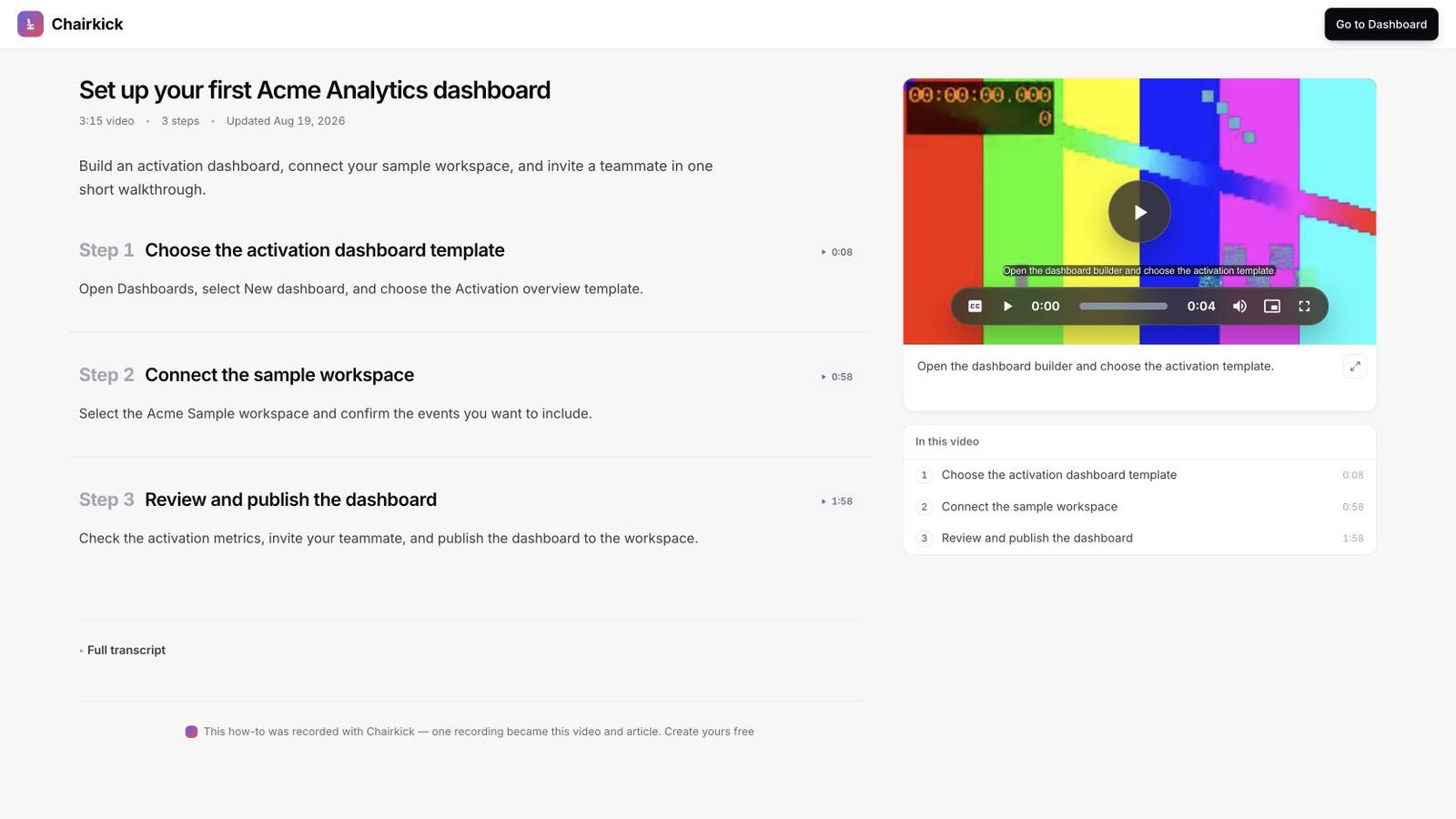
A synthetic Acme Analytics example shows the reusable shape: one short task, three timestamped steps, and one page that works as both video onboarding and searchable documentation.
Real onboarding libraries worth studying
You don’t need to guess what a good library looks like. Several well-known SaaS products publish theirs, and each shows a different lesson worth copying.
- Figma: learn by building one real project. Figma’s Figma for beginners tutorial is four parts (Explore ideas, Create designs, Build prototypes, Prepare for handoff), and the whole series designs a single social media app. Instead of touring features, every video moves the same project forward, so the viewer ends with something finished. Copy the idea for your first-run video: one concrete outcome, not a menu tour.
- Notion: short lessons grouped into courses. Notion Academy organizes video lessons into courses, starting with a Notion 101 introduction. A new user can pick the lesson that matches today’s question instead of sitting through a long overview. Copy the grouping: by task, in the order users meet them.
- Canva: paths by use case. Canva’s Design School is free to all users and groups its courses by what people are making, such as presentations, social media and documents. A teacher and a marketer start in different places. If your product serves several roles, give each role its own starting video.
- Airtable: setup and team invites as separate topics. Airtable’s training and resources page offers on-demand getting-started sessions that cover adding your data, then inviting others with the right permissions. That mirrors videos 1 and 3 above: the person building the base and the person setting up the team need different help.
None of these is a single cinematic tour. They are libraries of small, task-shaped pieces, which is exactly what makes them useful to someone who is stuck.
A simple script for any of the six
Most onboarding videos fail on structure, not production quality. This outline works for all six formats:
| Part | What to say | Rough share of the video |
|---|---|---|
| Outcome | “In this video you’ll connect your CRM so new deals sync automatically.” | First few seconds |
| Starting point | Where the viewer should be and what they need open (account, permissions, API key) | Short |
| Steps | Each click, narrated in plain language, with the decision points called out | Most of the video |
| Result | Show the working end state, so the viewer knows what success looks like | Short |
| Next step | One link: the next video, the relevant doc, or the support contact | Last few seconds |
Two rules make the outline work. Say the outcome before anything else, so viewers know in seconds whether this is the right video. And stop when the task is done. Anything after the result belongs in a different video.
How to produce them without a video team
You don’t need studio gear. A clear microphone, a clean browser profile without personal bookmarks, and a test account with realistic data cover most of it.
- Write the outcome sentence first. If you can’t state it in one sentence, split the video.
- Do a dry run of the steps in the test account so nothing surprising happens on camera.
- Record in one take with your screen and, optionally, your camera. Small stumbles are fine; viewers trust a real person more than a polished voice-over.
- Trim the start and end, then publish it where the question comes up.
- Add written steps for people who would rather skim.
Our guide to making a tutorial video covers recording technique in more detail. For product walkthroughs aimed at prospects rather than new users, see the product demo video maker. If you want the written version generated for you, Chairkick’s video guides turn one narrated recording into editable steps with screenshots.
Where to place each video
A great video nobody finds does nothing. Match each format to the place the question comes up:
| Video | Best placement |
|---|---|
| First-run setup | Welcome email and the empty state of the main screen |
| Integration walkthrough | Next to the “Connect” button and in the integration’s help article |
| Admin and team setup | The invite screen and the admin onboarding email |
| Top-ticket answer | Your support macros and the matching help-center article |
| New-feature walkthrough | Release notes and the in-app announcement |
| Migration guide | The import screen and your “switch from” landing page |
Bottom line
Start with the first-run setup video, then let your support inbox pick the next recording — it already knows where users get stuck. Keep each video small, human, and paired with written steps, and six short recordings will carry more onboarding weight than any product tour.